|
Ch. 8. Packages and Interfaces |
Session 8Interfaces - more abstract than abstract classes
|
See http://www.write-technical.com/126581/session7/session7.htm#subclass-abstract
Syntax:
if(objectName instanceof className)
returns true of the objectName refers to an object of the specified className.
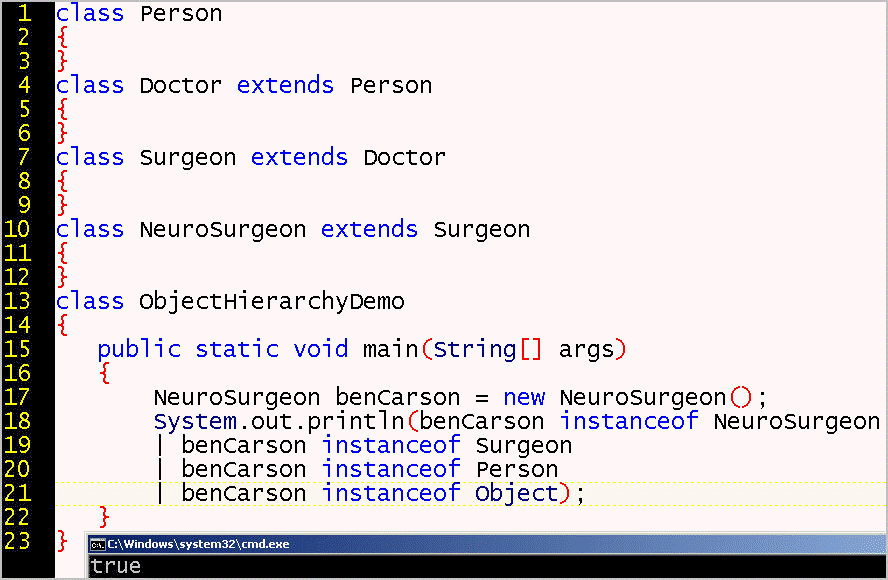
In the following program, if we ask if whether the object is an instance of a String, the compiler says "incompatible types: NeuroSurgeon cannot be converted to String". However, an object is of its own type as well as of all the type of each of its super types.
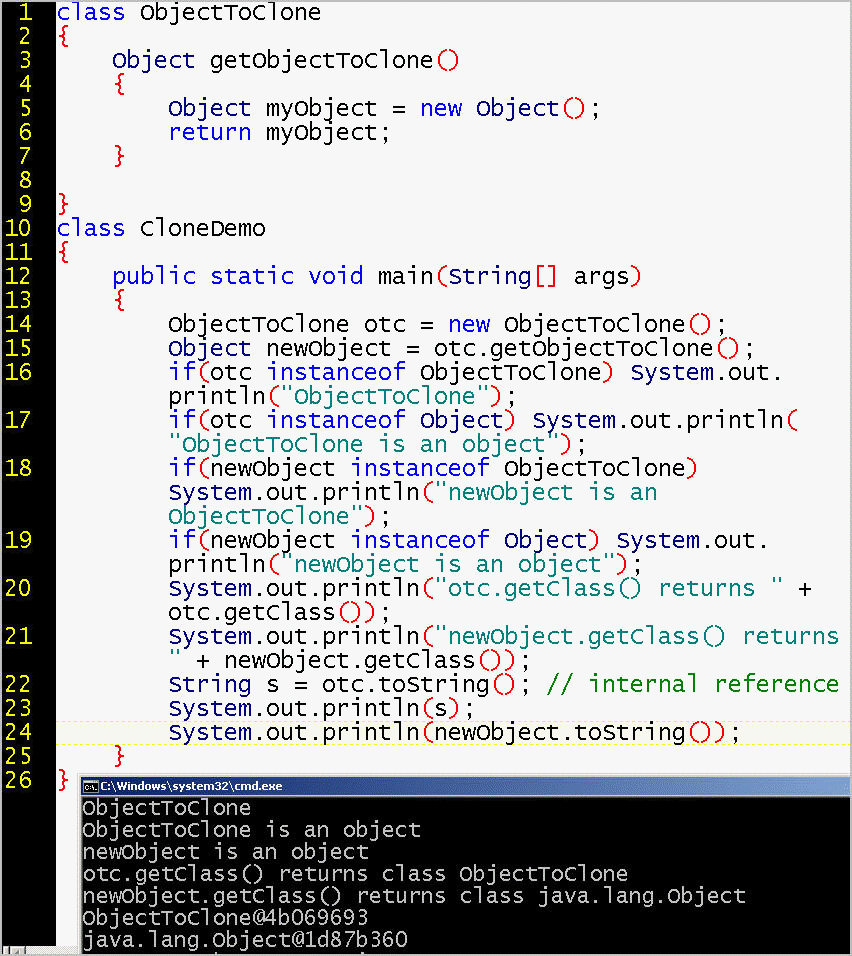
CloneDemo.java shows the the instanceof operator allows us to test whether an object belongs to whatever type we happen to need. We also use three methods that every object inherits from java.lang.Object, namely, clone(), getClass(), and toString().
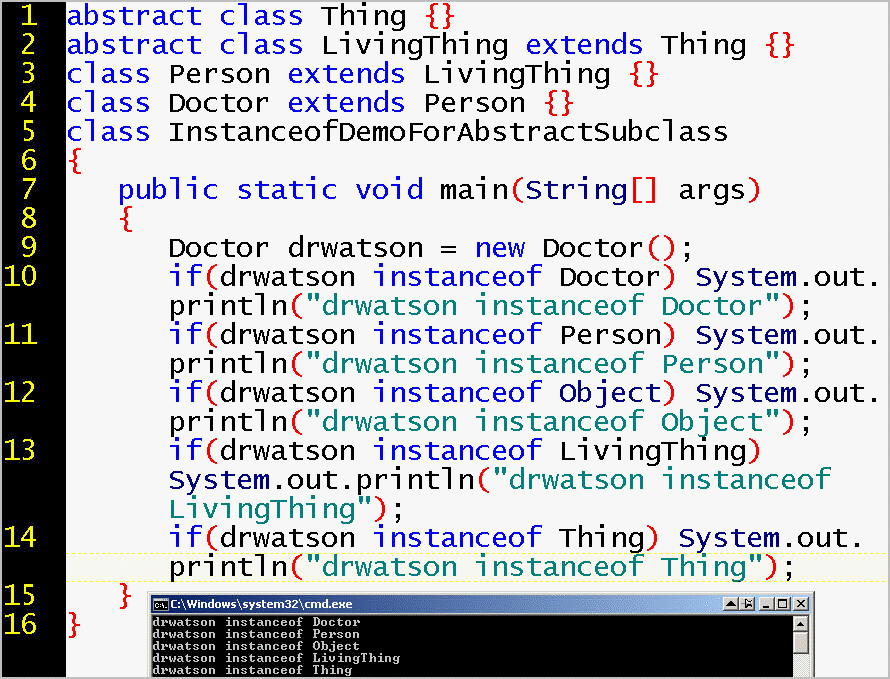
InstanceofDemoForAbstractSubclass.java shows that we can use the instanceof operator to verify whether an object is of a specified type. Remember that each class is a type. The same boolean result occurs whether that specified type is the object's direct type or its superclass or its abstract superclass.
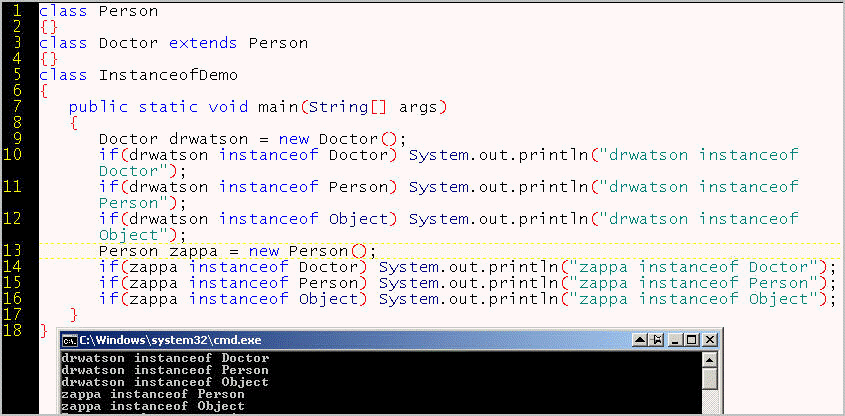
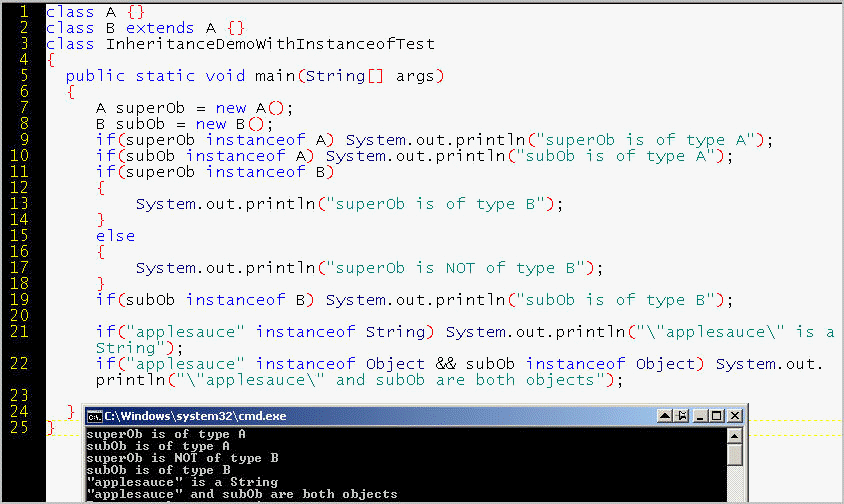
Just as a child inherits a family name, so a subclass object is of the same type as its parent. However, the parent is NOT of the same type as its child. The instanceof operator allows you to test whether an object reference is of the type you need it to be. For example, in InstanceofDemo.java, a doctor is an instance of a person, but a person is not an instance of a doctor.
A use case for the instanceof operator is to avoid the mistake of trying to fit an object into an array of its subclass, which is illustrated in InstanceofDemoWithArray.java.
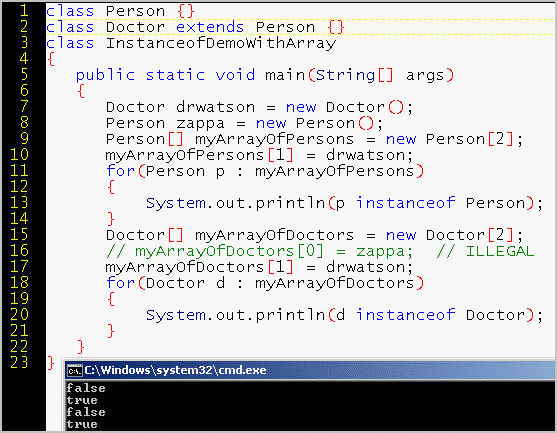
An object of a subclass type is also of its superclass type, but an object of a superclass type is NOT of its subclass type:
In Java, the inheritance tree is single, not double. It is as if Barack Obama were of type Obama, not of type Dunham.
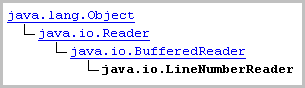
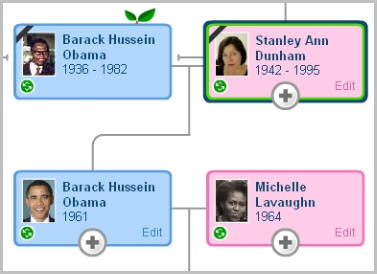
The advantage of single inheritance is simplicity, especially for debugging.
Use case for an interface. Consider the javax.sql.DataSource interface at http://docs.oracle.com/javase/8/docs/api/index.html?java/sql/Driver.html. It allows independent vendors of drivers to connect to a wide variety of data sources. The interface is abstract enough that it can provide guidance for different situations.
Syntax:
interface interfaceName { ...} // definition
class className implements interfaceName { ...} // implementation
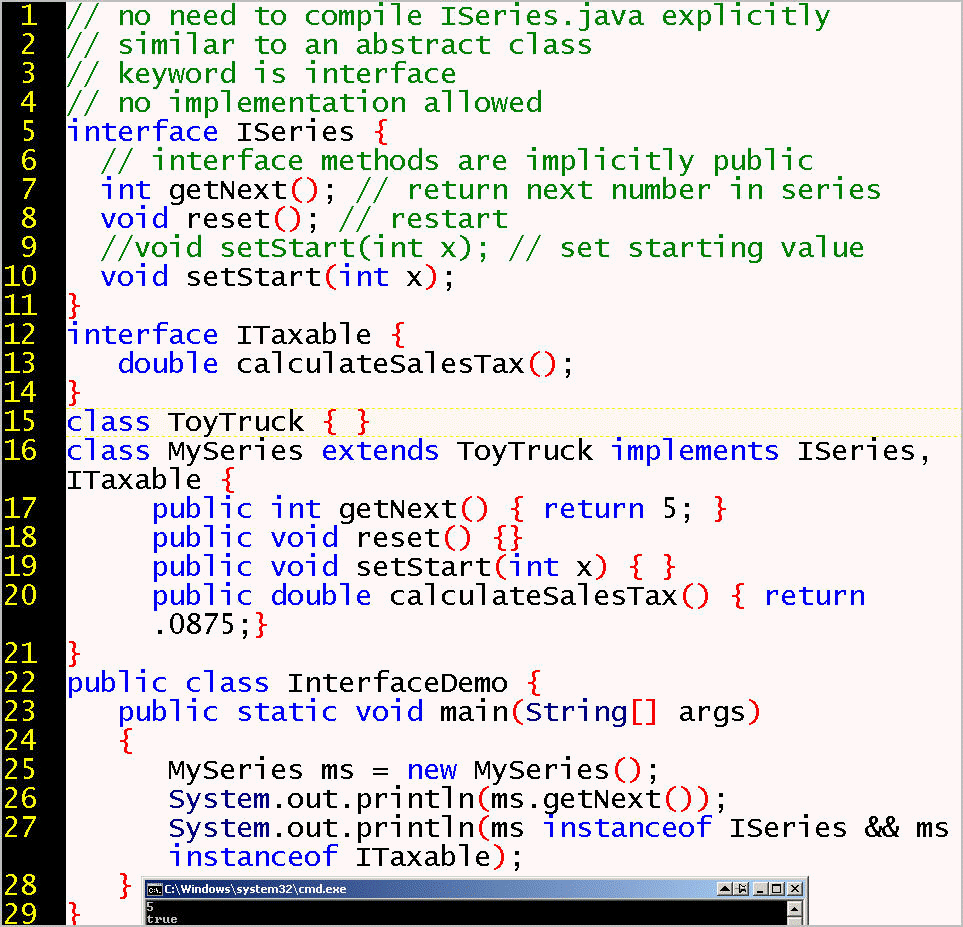
InterfaceDemo.java introduces the syntax for interface creation and establishes that an interface is, like a class or an abstract class, is a type that is testable with the instanceof operator.
Soymilk implements IMilk but is not a subclass of Milk because it has the CAPABILITY of being mistaken for milk ... until we learn that it originates in dried soy beans not mammary glands. In Europe, the dairy lobby has ensured that the name "soy milk" is illegal, and the beverage must be named "soy drink". In the United States, the product is named by its milk-like interface, its capability to be milk-like in some way: white, fluid, nourishing.

Last week we looked at abstract classes. Tonight we look at that which is more abstract than abstract classes: interfaces, which do NOT implement behavior (methods) but tend to describe or prescribe a CAPABILITY (the signature and return type of methods).
Let us say that ICamouflage is the CAPABILITY of looking similar to one's surroundings, which has differing implementations, such as by mimicking color:
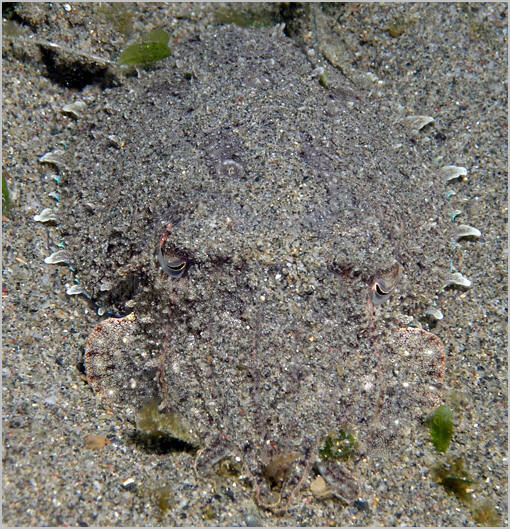
Or by mimicking shape, or perhaps by implementing both IShape and IColor:
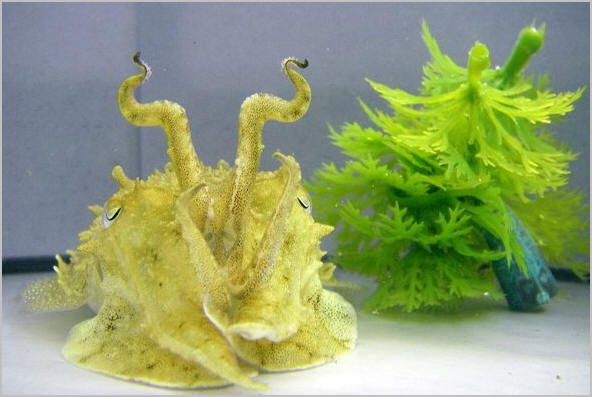
If those surroundings change, the implementation of similitude needs to change accordingly. Suppose that instead of being a cuttlefish surrounded by sand, you are a herring or a sardine surrounded by bluish/silvery diffused light. You would implement ICamouflage with the CAPABILITY of hiding within light by reflecting that light.


Interface IMirror
{
Light reflectLight();
}
Class Sardine implements IMirror
{
Light reflectLight() { }
}
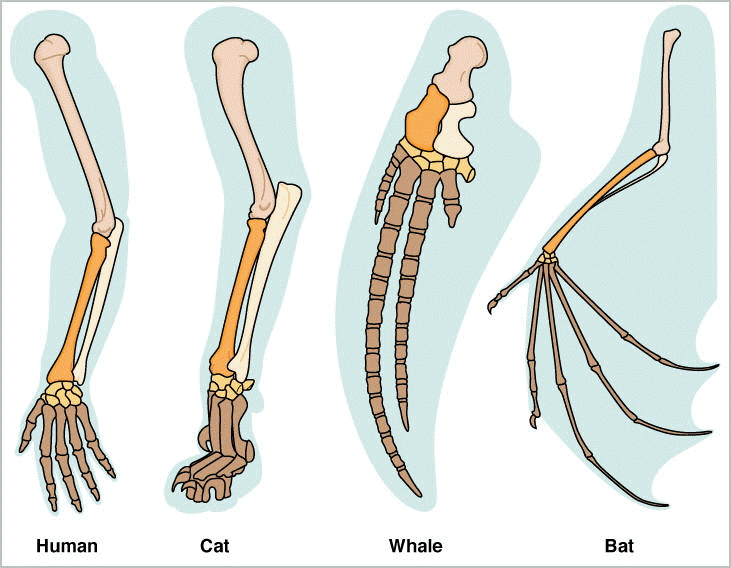
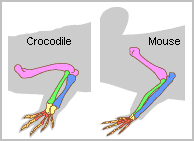
The CAPABILITY using a five-fingered hand. Because an interface has no implementation, the penta-phalangic classes the contain implementations can be customized or adapted to different situations. Interface IFiveDigits is implemented by Human, Cat, Whale, Bat, Frog, Crocodile, and Mouse for uses as varied as typing Java code, scratching the pet owner, steering underwater, flying at night, swimming up a river, climbing a tree, a stealing cheese from a mouse trap, or eating a buffalo at the water's edge. While the whale swims mostly with its index finger, bats are powered by their pinkie.
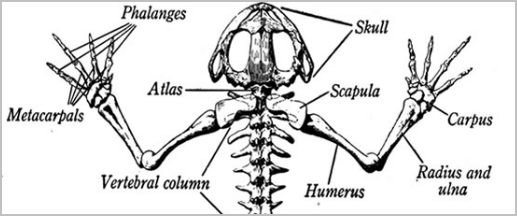
Crocodile and Mouse both
implement this interface:
The CAPABILITY of resembling
an egg in some way. What do Easter Eggs have in
common with the fruit of a plant from India that the Persians called bādingān,
the Arabs called (al)-bāḏinjān, the
French called aubergine, the Spanish called alberengena, the
Catalonians called albergínia, and the Portuguese called beringela.
?


Both implement the interface IEgg, which
contains the lookSimilarToEggInShapeOrColor
method.

The CAPABILITY of resembling a bear.
To what extent does the GummiBear class implement the
IBear interface? Can a human being implement IBear
with a "bear-hug" method?


The CAPABILITY of being
Mozartian. 99 years after Wolfgang Mozart
died, a Frenchman decided to evoke Mozart's delightfulness with the interface,
IMozart which contains one static field,
madeInSalzburgAustria.

The CAPABILITY of having the
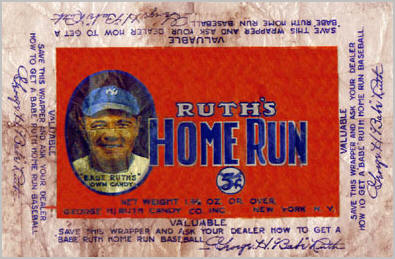
tremendous energy of a baseball slugger named Ruth. Named after the man who made
swinging a bat a sport with mass appeal in the 1920's, the Baby Ruth candy bar ostensibly
implements the IRuth interface, which contains
the method, stayAwakeForSixHoursAndFortyMinutes,
useful for drivers and outfielders alike.

George Herman "Bambino" Ruth's own candy bar was too late to market, and too
narrowly confined to the baseball theme. In other words, this athlete did not
think about all the interfaces that would expand the capabilities of his objects
to satisfy a broader public than just baseball fans.

More professional advertising exploited the IRuth interface
for use in realms not necessarily implemented only in baseball. Instead, what
got sold was a general claim to energy (NRG)
sufficient for excellent performance, whether for driving, playing baseball, or
swimming.
You don't need talent or skill, just sugar!


An abstract class should have one or more abstract methods.
An abstract method is a template for defining a method. It
specifies the parameter signature and the return type, nothing more.
An abstract class permits partial implementation at its level, and requires complete implementation at the subclass level(s).
But what if we have no default implementation to provide? Perhaps we would want something more abstract than an abstract class. An interface is more abstract than an abstract class because an interface prohibits--at its level--implementation, even partial implementation.
Note: Starting with Java 8, an interface can have a default method. This feature was added to provide flexibility without breaking applications that use an older version of the interface.
Starting with Java 8, an interface can contain a default implementation of a method by using the keyword default:
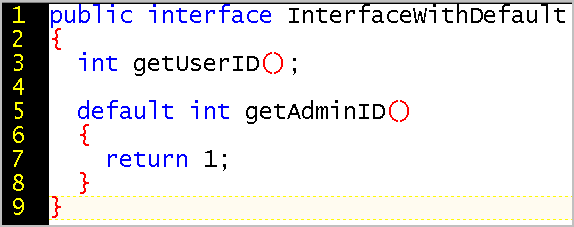
The class that implements the interface does not need to implement the default method.
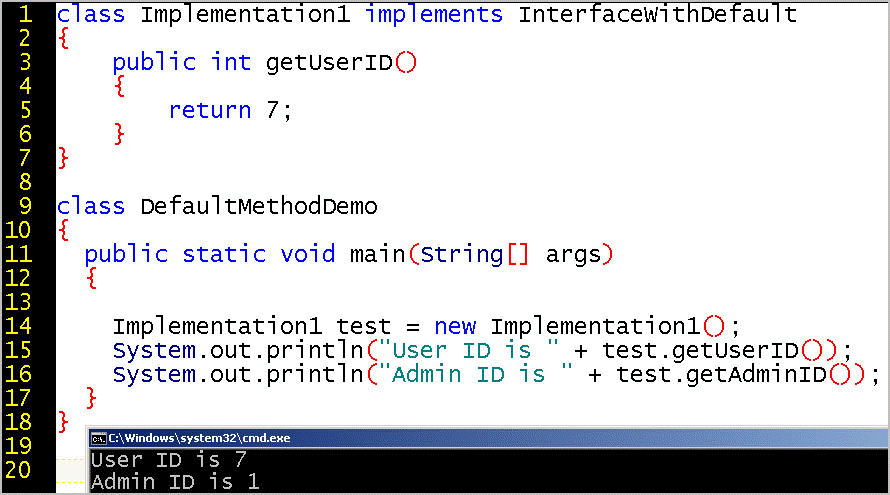
Default methods allow you to extend an interface, and are sometimes called extension methods, but this sense of the word "extend" is different from the "extends" used to declare a sub-interface.
Starting with Java 8, an interface can contain a static implementation of a method by using the keyword static:
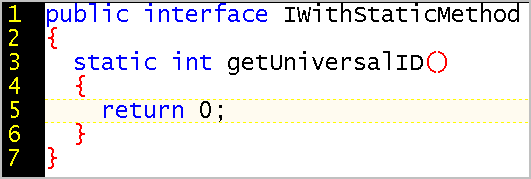
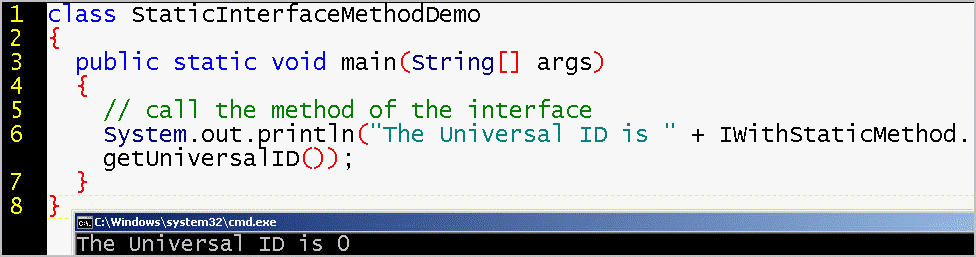
Just as you call a static method of by using the class name, you call the static method of an interface by using the interface name. No object is necessary.
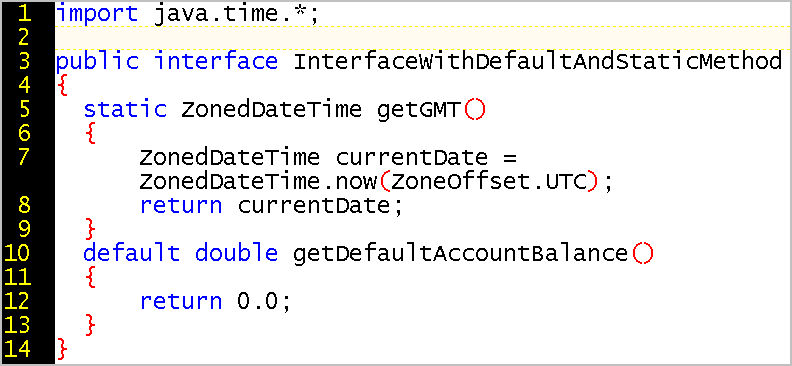
An interface can contain 0 or more methods, and the methods can be static or default:
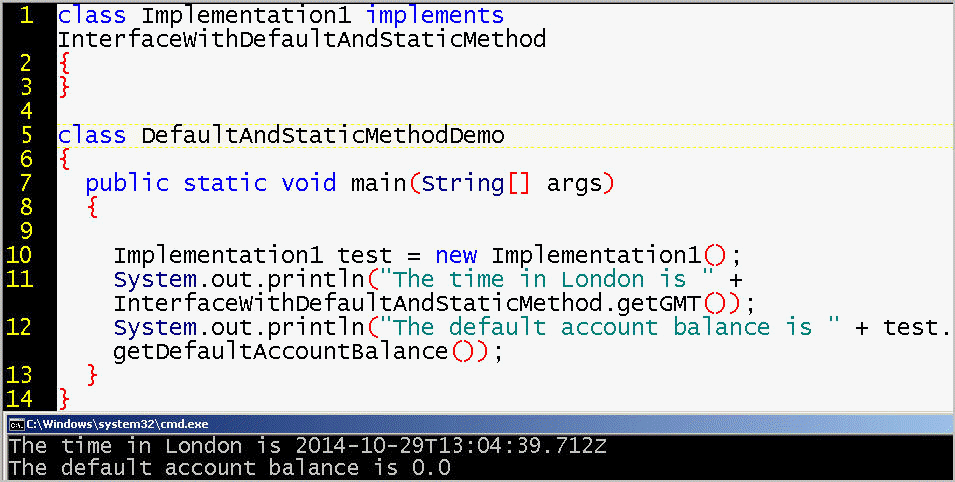
If an interface contains solely static or default methods, the class that implements the interface can have an empty body.
Because technology, science, and business constantly change, interfaces make the architecture of your code independent and stable. Interfaces also protect customer-developers using your published APIs from the changes you make to your internal code engine as you improve your software. For example, your customer-developers can continue to use your software even when you issue a new version with significant bug fixes.
Suppose you were designing Java and you wanted to support, as much as possible, other programmers who, decades later, might write their own compiler for Java (such as the programmers at Google). An interface might be the only way to support the CAPABILITY of determining whether the current version of Java is a version that the (currently non-existing) compiler supports. You might abstract such a compiler into the concept of a tool, and have an interface for tool support, the javax.tools.Tool interface:
http://docs.oracle.com/javase/7/docs/api/javax/tools/Tool.html
for
a command-line utility, which requires a method to find out which versions
of Java the tool supports, which is to be determined before invoking the tool's
run method. "The set of tools available with a
platform is defined by the vendor." The designers at Sun did not
need to know exactly which
tools their customer-programmers would need.

The Java API link to "All Classes" should be labeled "All Classess and
Interfaces" because it lists each interface in italics, and perhaps 30% of
the APIs are interfaces rather than classes.
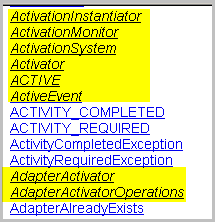
(A significant number of the Java APIs are abstract classes, such as http://docs.oracle.com/javase/7/docs/api/javax/swing/JComponent.html, and an example of an abstract method is http://docs.oracle.com/javase/7/docs/api/javax/swing/text/AbstractWriter.html#write%28%29)
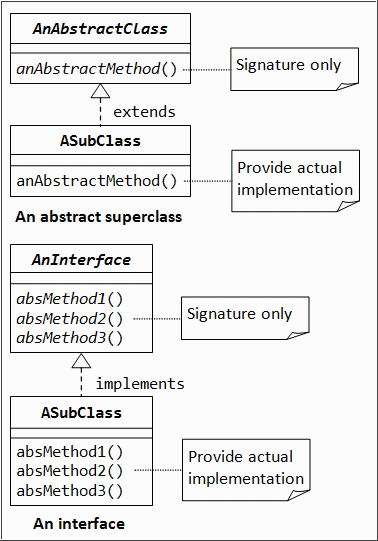
Unified Modeling Language (UML) diagram of the conceptual distinction between an implementing class and the interface or abstract class that dictates the signature to use when implementing.
Syntax keyword:
Let's summarize:
Often, an interface represents a capability, or a declaration of intent, such as ITaxable, IShippable, IReturnable, IBreakable, IPettable, ICarnivore, IClonable, ISerializable.
Note:
Interface names should be either an adjective, such as Taxable, or a noun (like a class or an abstract class).
The members of an interface must be public.[The following examples would normally have the interface in a separate file, with the "public" declarations for the members.
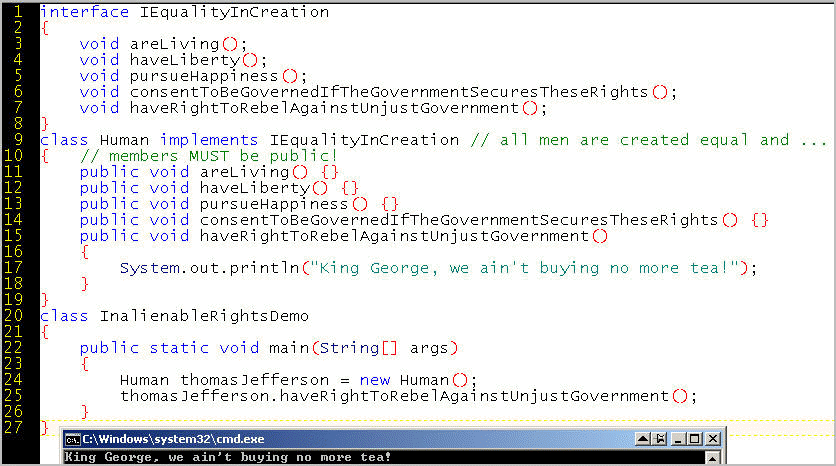
The Declaration of Independence makes a claim akin to what Java calls in interface insofar as all "men" are implementations of the EqualityInCreation interface, and thereby have these behaviors or methods: areLiving(), haveLiberty(), pursueHappiness(), consentToBeGovernedIfTheGovernmentSecuresTheseRights(), and haveRightToRebelAgainstUnjustGovernment(). The interface is a blueprint only, and does not specify the exact behavior of specific "men", which can range from dumpTeaIntoTheSea to killBritishSoldiers.

In this regard, we can say that Jefferson's actions or behavior means he was an implementation of multiple interfaces, simultaneously an object of the following types:
(In 1789 in Paris, a 44-year old "white" diplomat in the pursuit of happiness getting his 16-year old "black" servant pregnant was not considered a scandal, especially while the French were preparing to chop off their King's head. However, to get Sally Hemings back on the farm after she'd seen Paris [where she could have remained free], Jefferson had to promise to reclassify both the mother and her children as "white" upon his death). http://en.wikipedia.org/wiki/Sally_Hemings
Here's an instance of RoboDog, which is a subclass of Robot. Unlike Robot, RoboDog implements the Pet interface, which specifies the requirement or CAPABILITY of doTrickForOwner method.

Alternatively, we can imagine a bionic cyber-creation DogBot as a subclass of Dog, which might already have a doTrickForOwner method. Unlike Dog, DogBot implements the Robot interface, which specifies the requirement for an bootUpWhenStartButtonPressed method.
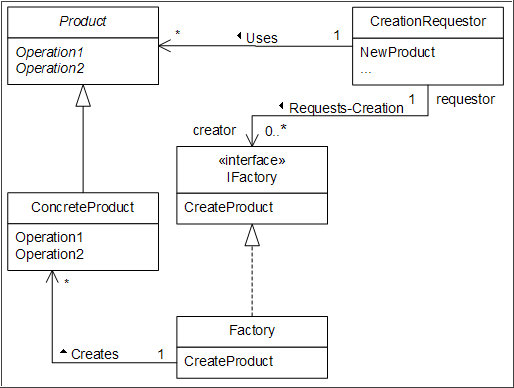
Here is a diagram showing how an interface can be part of a larger picture. The Factory class implements the IFactory interface by implementing the CreateProduct class, which, in turn, returns a ConcreteProduct object, which is a specialized Product.
Interfaces, for purposes of design, avoid the constraint of single inheritance. A class can implement zero, 1, or many interfaces. Also, we cannot directly blame a runtime bug on an interface.
That a class can implement multiple interfaces is NOT an exception to the rule of single inheritence from a single parent class. Indeed, interfaces cannot cause a "bug" insofar as an interface has no runnable code. Suppose that Television implements both the IImage interface and the ISound interface. Debugging a sound problem involves the implementation within Television because ISound has no implementation, and therefore no bugs. Debugging a class that implements multiple interfaces is an operation carried out along a single path of inheritance from the superclass, up the single-inheritence chain. Therefore, the existence of multiple interfaces does not complicate debugging.
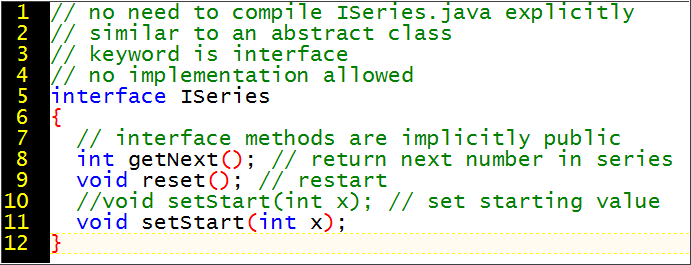
Best practice is to put a public interface in a .java file with its name, for example, ISeries.java
Note: The convention of beginning an interface name with the capital letter "I" is a good one, although coders do not always observe it.
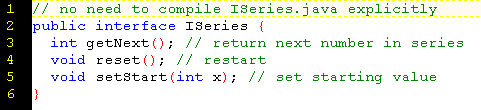
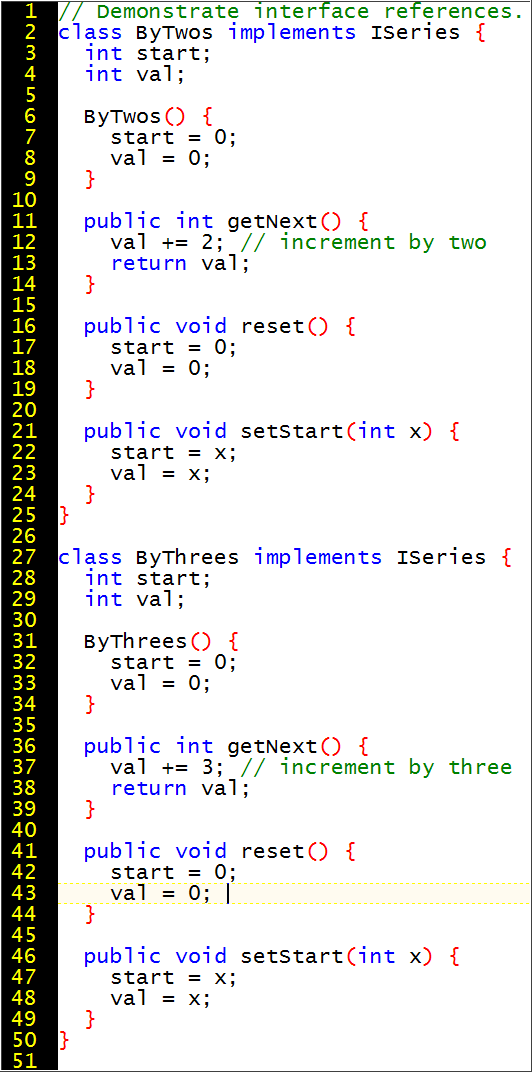
The class that implements the interface can be instantiated.
An interface can be compiled to a bytecode file, and the bytecode file has the normal extension .class. However, ISeries is NOT a class, and its bytecode has no point of entry for execution because the main method is an implementation and interfaces have zero implementation.
Whereas a subclass extends its superclass, with interfaces, the implementing class declares the keyword implements, which signals the compiler that this class follows the specifications of the ISeries interface.
The implementing class has to fulfill the contract of the interface regarding methods:
This is more strict than a method (or constructor) overload, which does not care about the return type Indeed, a method overload and an interface method implementation follow the same rules for matching method name, parameter list, and return type. But a class that implements an interface method is not overloading a method, because the specified method in the interface is only a specification, not runnable code.
Note that methods have the public modifier, which is required by the compiler.
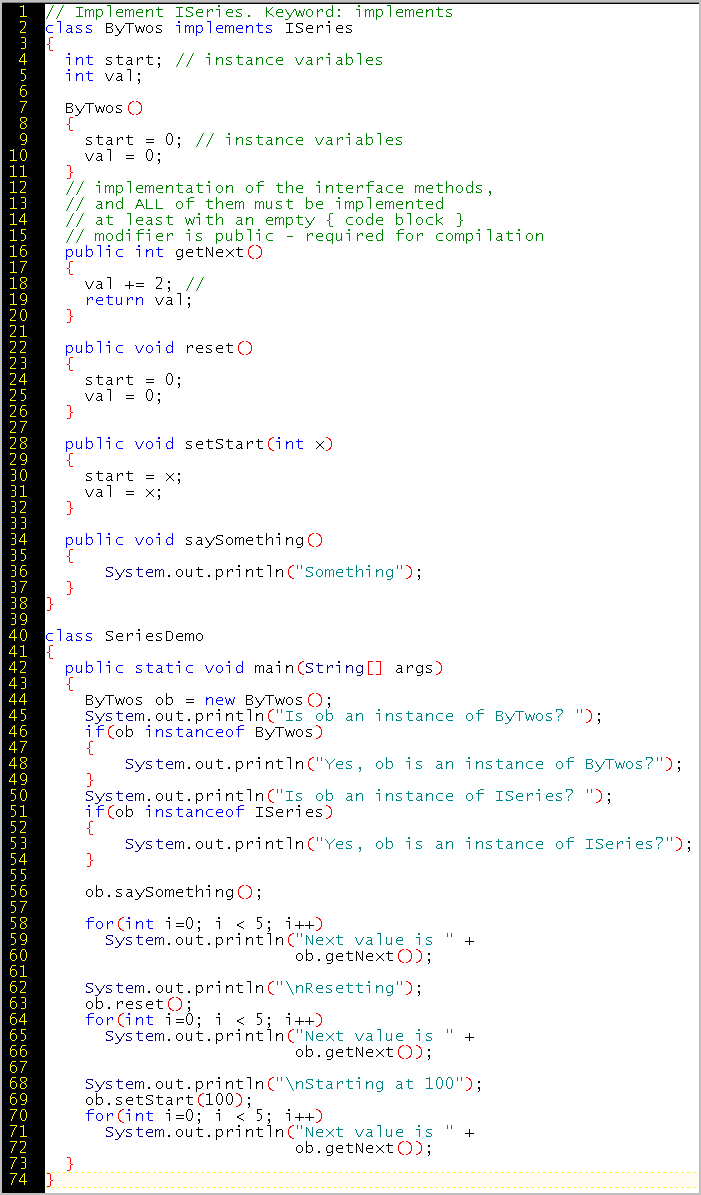
TIP: Assuming the ISeries.java file is in the same directory, you do not have to compile it. The compiler follows the reference to ISeries and does the compilation for you.
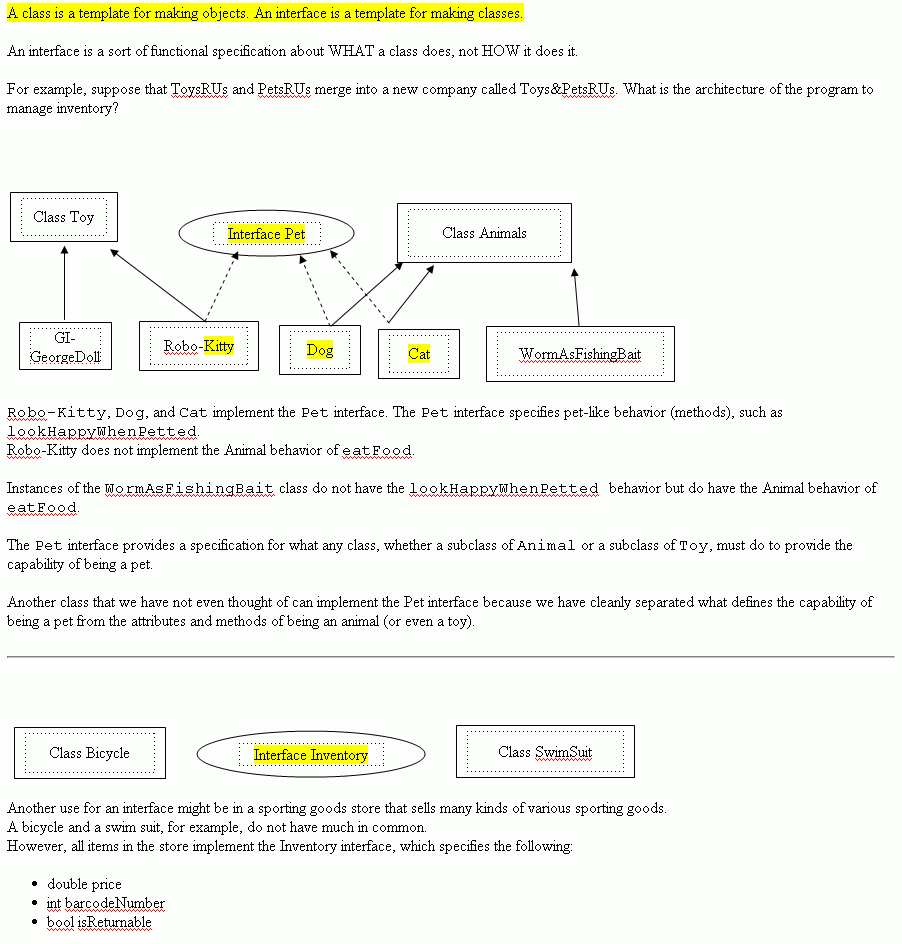
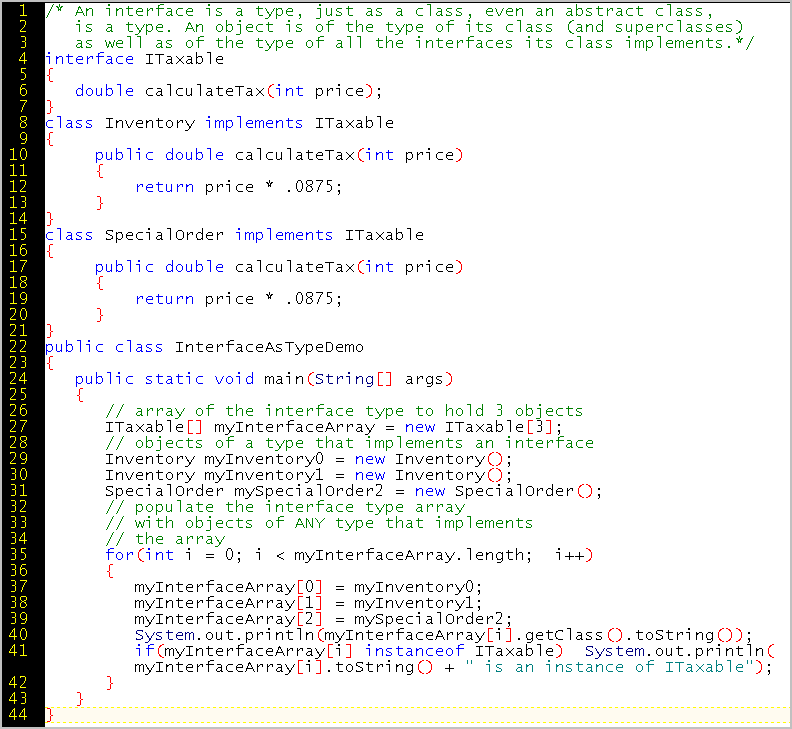
In this example, The ITaxable interface becomes tangible both in the company's on-hand inventory and the company's special order from a third-party for resale. The internal revenue service prefers than many classes be implementations of the ITaxable interface.
Each object is an instance of its class, as well as an instance of all its
superclasses and all its
interfaces:
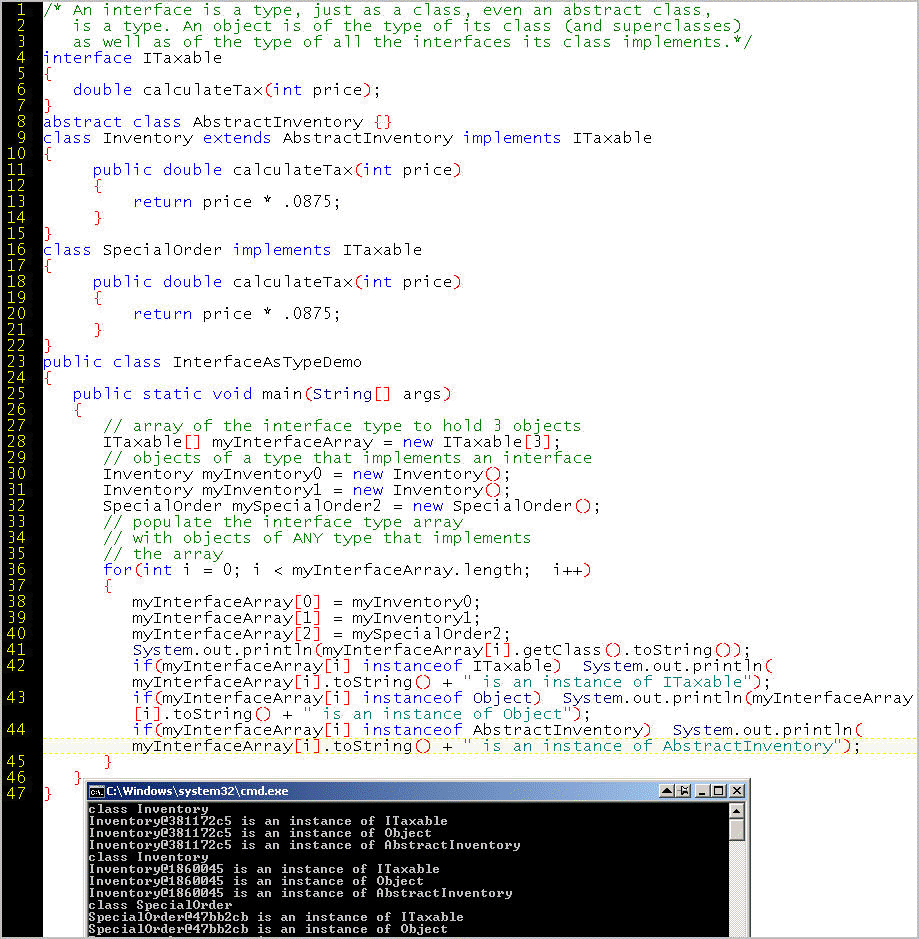
Similarly, if you buy a basketball at a sporting good store, you buy an object of many types:
At a grocery store, a bottle of vodka object is of a class that implements ITaxable, but a carton of milk is not of ITaxable. Milk might be of ITaxExempt. For something to fall under the capability of being taxed, all it takes is for the legislature to make a speech act proclaiming such. For example, eating a pastry "for here" rather than "to go" can change the taxability of an object without changing the implementation of the object.
Note that to be taxable, the Vodka or Pastry class does not need to implement any method. The taxability of certain items is assigned in a manner that is external to the methods of the class. Some interfaces are a like a flag, badge, signal, or declaration of intent or consent, rather than a set of implemented behaviors.
A Java interface can be used in three kinds of scenarios:
Discussion of these three points:
For example, a referee's distinctive uniform is an interface that is tightly bound to specific capabilities or behaviors, such as stopping play and calling penalties. A player object that implements the Player interface can execute the scorePoint() method, but a referee object that implements the Referee interface can disqualify that point. We do not expect the Referee flag interface to accompany melodic whistling and break dancing, nor to we expect the Referee to intercept the ball and claim to have scored a point.
A uniform can be an interface that says "I publically announce my willingness to work with any other object of the same interface type." For example, these unarmed Japanese security guards are not at the Department Store because it is their Shopping Day. Instead, they use their uniforms to signal to each other a capability to work together in a consistent, "uniform" manner. A uniform says, "I am of my type, not a rogue individual." Blue Guard X might not even know Blue Guard Y as an individual. If so, the sole implementation of type both external to the group and internal to the group is the outward flag interface.
Could there be any Raven fans disguised as 49er fans who just want to party in the street?
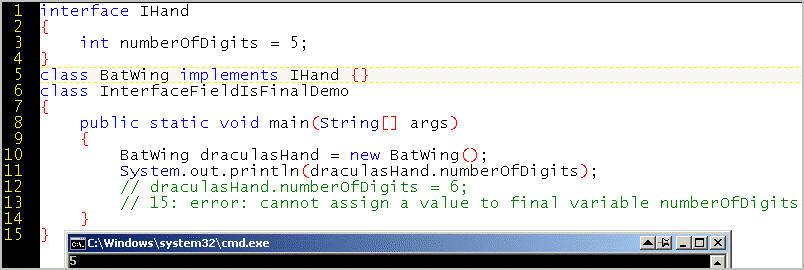
You can use final int or an interface field to lock the number of a "six-pack" at six, whether implement by Cans, Bottles, or AbdominalMuscles.

An analogy might be a state license plate, where the
licensePlateNumber is a
static constant (pure data, no behavior):

The provider of a set of APIs can create an empty, "marker" interface so that programmers know a key piece of information about a Best Practice for using classes that implement the marker interface. For example, a programmer might want to know whether an ArrayList object performs well for both sequential and arbitrary data access - see http://docs.oracle.com/javase/7/docs/api/java/util/RandomAccess.html, which is a "Marker interface used by List implementations to indicate that they support fast (generally constant time) random access."
Analogies:






EXAMPLE OF JAVA API INTERFACE
The ActionListener interface specifies one signature for one method.
http://java.sun.com/j2se/1.4.2/docs/api/
public interface ActionListener
The listener interface for receiving action events. The class that is
interested in processing an action event implements this interface, and the
object created with that class is registered with a component, using the
component's addActionListener method. When the action event occurs,
that object's actionPerformed method is invoked.
public void actionPerformed(ActionEvent e)Invoked when an action occurs.
An interface cannot provide any form of implementation, and the interface might be implemented by many, one, or zero classes.
Whereas a class can only inherit from one superclass (even if the class hierarchy creates a multi-level vertical chain), a class can implement multiple interfaces.
Interfaces provide an alternate route to specifying functionality without breaking the principle of single inheritance. The price is that functionality is merely specified as a signature and return value, but not implemented concretely.
An interface, like a class, is a type. A class that implements an interface can create objects that can pass for the type of the interface. Last week, with an abstract class, we saw "Dynamic Method Dispatch" ( http://write-technical.com/126581/session7/session7.htm#dispatch ) with resolution at runtime. Such type resolution can also work with classes that implement one or more interfaces. In this sense, an object is the type of ALL its inherited superclasses and ALL its implemented interfaces. The thomas object is of type Instructor and its superclass HumanBeing but also of the interface IEvaluateable insofar as all instructors can be evaluated.
When you define an interface, you specify required methods and/or fields for whatever classes implement your interface, but you do not fill in method code blocks, that is, you do not implement.
interface IDebatable
{
  void stateSomethingNotFactual(double myParameter);
  boolean insistOnSomethingNotFactual();
}
| CLASS | ABSTRACT CLASS | INTERFACE | |
| Definition: | A class must be complete, at least in form, or the compiler does not compile. Default behavior is not required but is generally the case. | An incomplete specification, which can provide default behavior. | A specification of behavior (methods) without any implementation
(no default behavior) and no fields except for constants that are
static and final.
No method bodies. In effect, an interface is an application programming
interface (API) with implicitly public methods. Note: Starting with Java 8, an interface can have a default method. This feature was added to provide flexibility without breaking applications that use an older version of the interface. |
| Inheritance: | A class can extend only ONE class. A class inherits from its parent class (single Inheritance), but can implement multiple interfaces. | A class can extend only ONE class, whether it is
abstract or not. The class that extends its abstract class parent can implement some methods and declare other methods to be abstract (for still later implementation) |
A interface can be implemented by zero, one, or more
classes.
An interface can extend zero, one, or more superinterfaces. The class that implements an interface must implement all interface methods and any superinterface methods. |
| When to create: | Create a class if you know the default behavior you want, and if you do not need to provide a specification for other programmers. | To partially implement a class now, and have you or others do
additional implementation later. Subclasses can benefit from the default implementation of (some) methods of the abstract class. API Flexibility: An abstract class allows you to add nonabstract methods without breaking an application with classes that extend the abstract classes.(If you add an abstract method, the situation is the same as if you modify an interface.) |
Create an interface if you want to define methods (no current implementation at all) that you, or others, will later implement, particularly if you think you might need to periodically re-implement the internals to take advantage of new technologies, or because you proactively perceive the risk or the need to fix issues that you do not yet know about. |
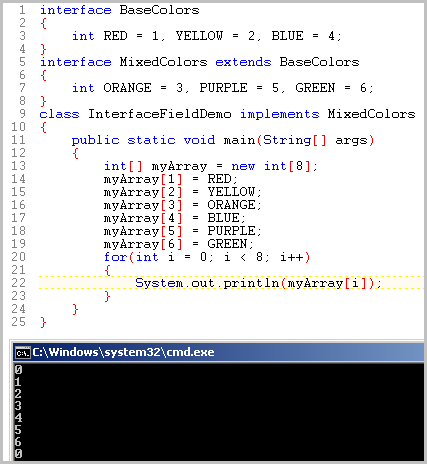
| Create an interface if you want a convenient way for any class to access to a set of constants. In this case, your interface would not contain any methods. | |||
| If you want a workaround for the absence of "multiple inherence". | |||
| Create an interface if you want a commitment to
stability and to impose a set of considerations for design. If in a subsequent release, you add a new method, applications built against your interface will break. Your customer-programmers will need to update and recompile their application. |
EXAMPLE
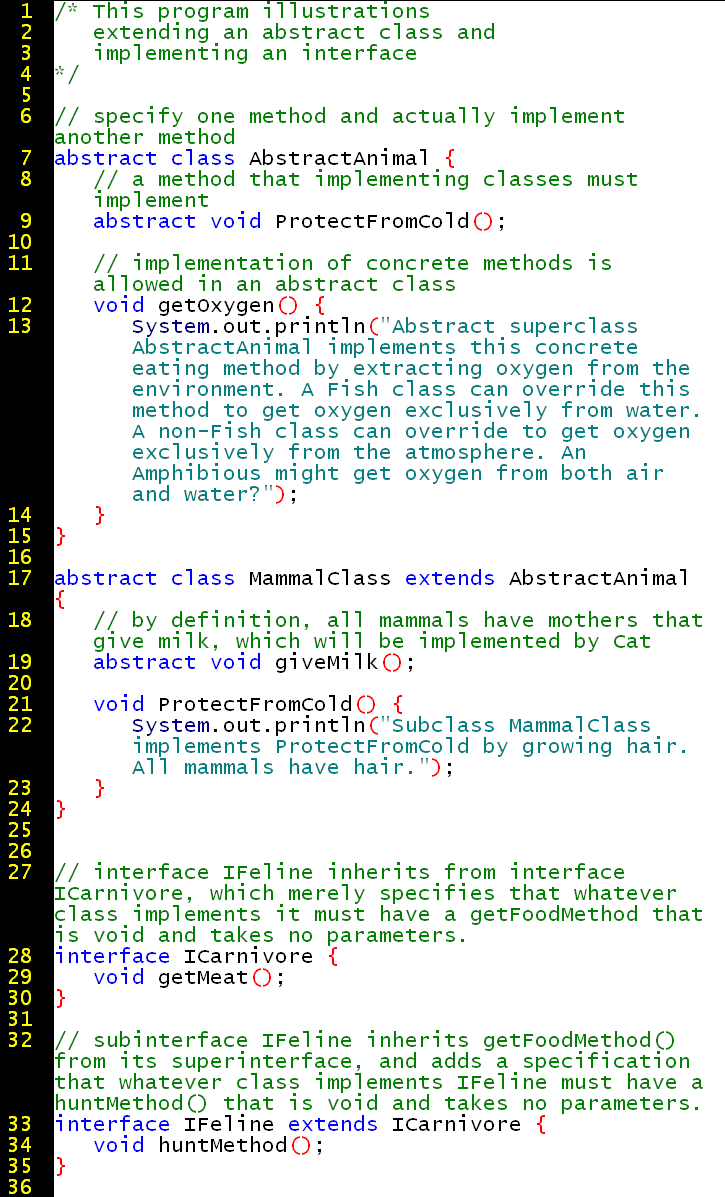
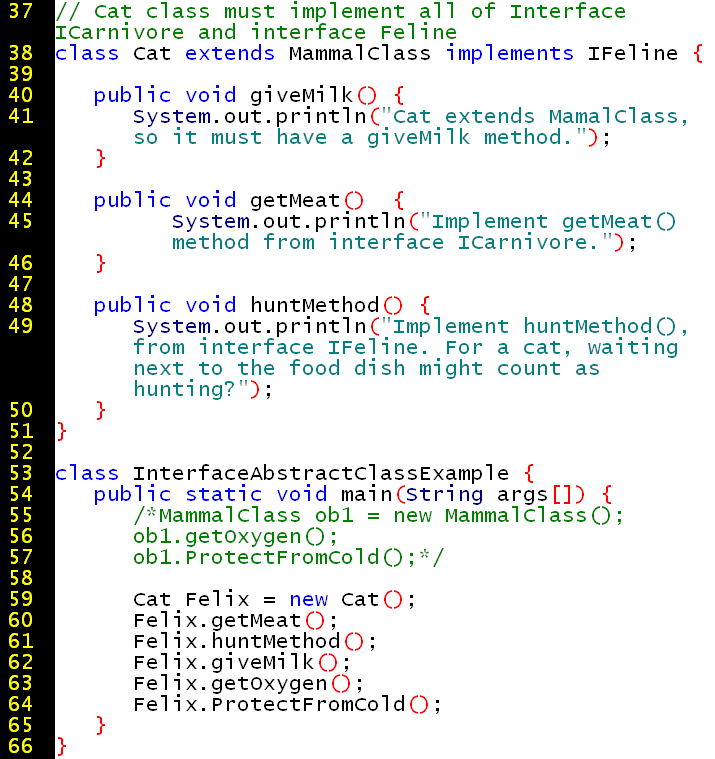
The output is:
Implement getMeat() method from interface
ICarnivore.
Implement huntMethod(), from interface IFeline. For a cat, waiting next to the f
ood dish might count as hunting?
Cat extends MamalClass, so it must have a giveMilk method.
Abstract superclass AbstractAnimal implements this concrete eating method by ext
racting oxygen from the environment. A Fish class can override this method to ge
t oxygen exclusively from water. A non-Fish class can override to get oxygen exc
lusively from the atmosphere. An Amphibious might get oxygen from both air and w
ater?
Subclass MammalClass implements ProtectFromCold by growing hair. All mammals hav
e hair.
|
An interface can be devoid of
content. Such interfaces do not require the implementation of any method.
They function as flags that indicate a capability.
That capability can be empty, (What capability is guaranteed when a car puts on its turn signal, or someone waves the flag at a parade, or a person swears "I do" at a wedding ceremony? Nothing is guaranteed. There is only a signal of intention, a speech act that other entities can recognize.) |
http://java.sun.com/j2se/1.4.1/docs/api/java/lang/Cloneable.html
A class implements the http://java.sun.com/j2se/1.4.2/docs/api/ java.io.Serializable Indicates support for moving not just data (fields) but objects (with their members and hierarchy) across a network. http://java.sun.com/docs/books/tutorial/essential/io/serialization.html |
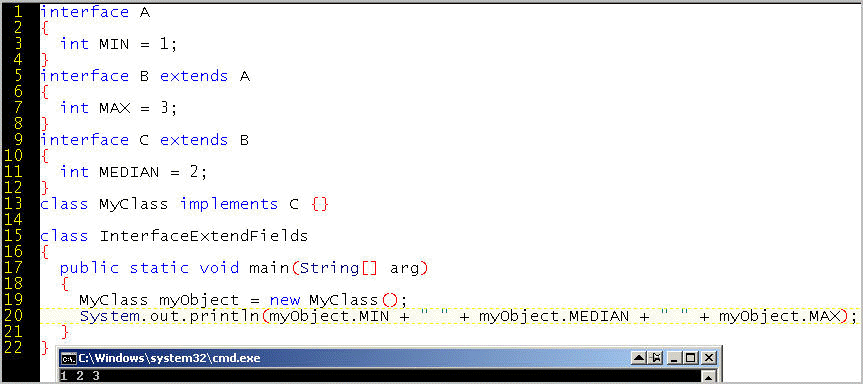
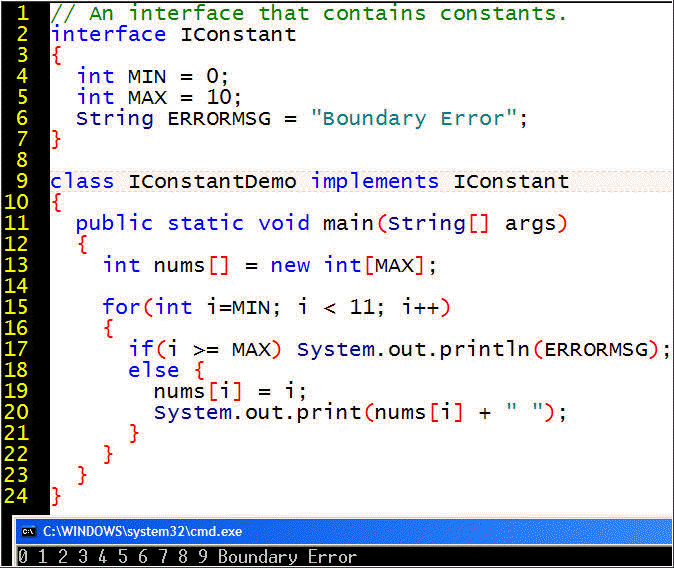
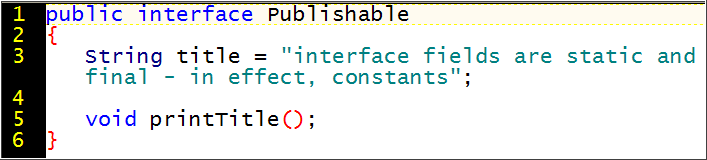
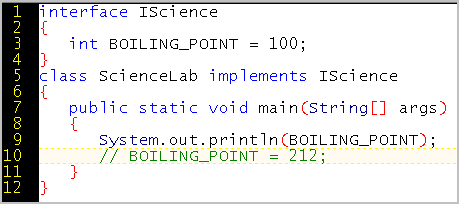
Most often, one finds methods in an interface. An interface specifies class members independent from, and prior to, any implementation or instantiation. Interface variables are a way to ensure that all objects of that type have pre-initialized variable values. (The other way is the implicit call to the superclass, which can initialize inherited values. But that will affect performance.) Therefore, an interface can also provide implicitly static variables because static variables exist prior to and independently of any implementation or instantiation of objects:
For example, we often write System.out.println("HelloWorld");
which uses something static so that we can print to the screen even before we instantiate any object.
public static final PrintStream out
For example:
----------
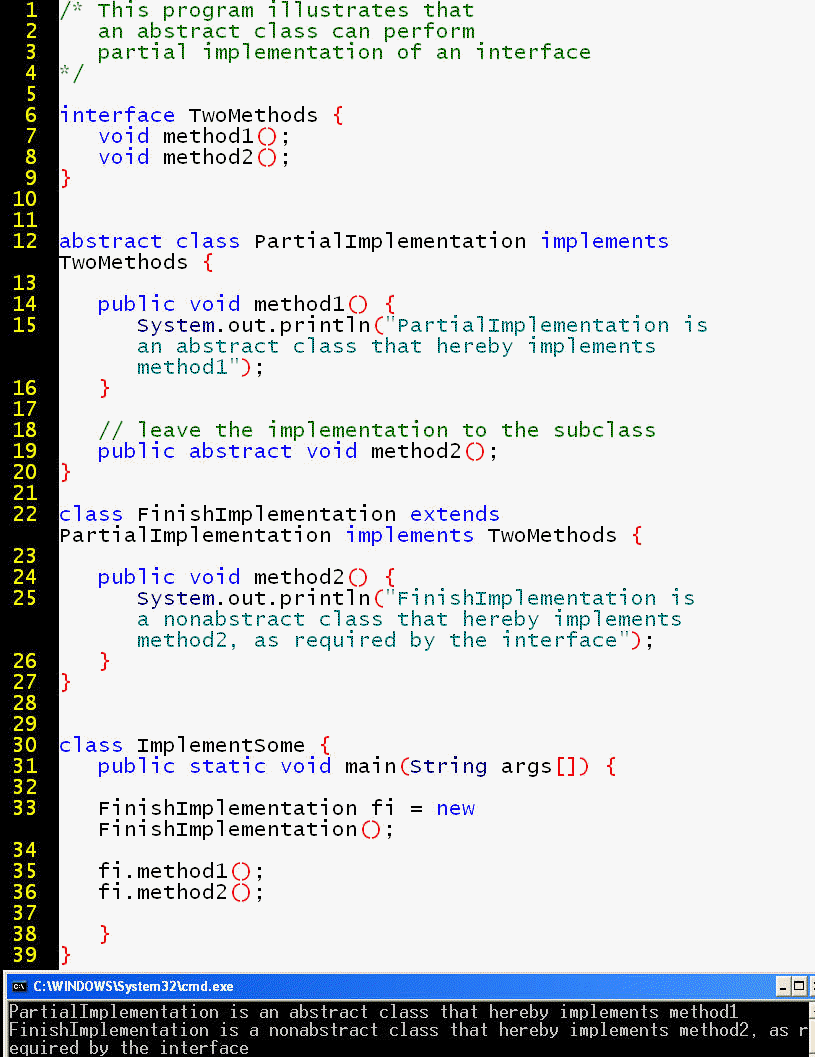
What if you only want to implement some (but not all) of the classes in the interface?
In this case, the implementing class must be declared an
abstract class with the modifier
abstract. The duty of
implementation must be fulfilled by whatever class extends the abstract class.
Neither an abstract class nor
an interface can be instantiated. The runnable bytecode represents either a subclass of the
abstract class or an class that implements all the methods the interface.
Whereas a class can extend zero or one superclass, an interface can extend zero, one, or many superinterfaces.
interface BrainSurgeon extends Surgeon, richPerson, doctorWithFiveYearsResidency, duesPayingMemberOfAssociationOfNeurologicalSurgeons, purchaserOfMalpracticeInsurance;
class FamousBrainSurgeon implements BrainSurgeon
{
// requires implementation of ALL the methods in ALL the superinterfaces
}
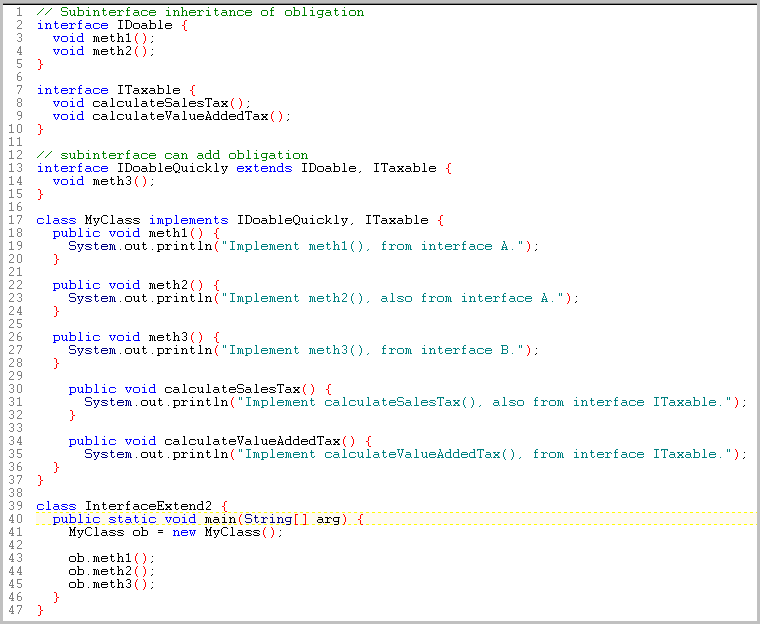
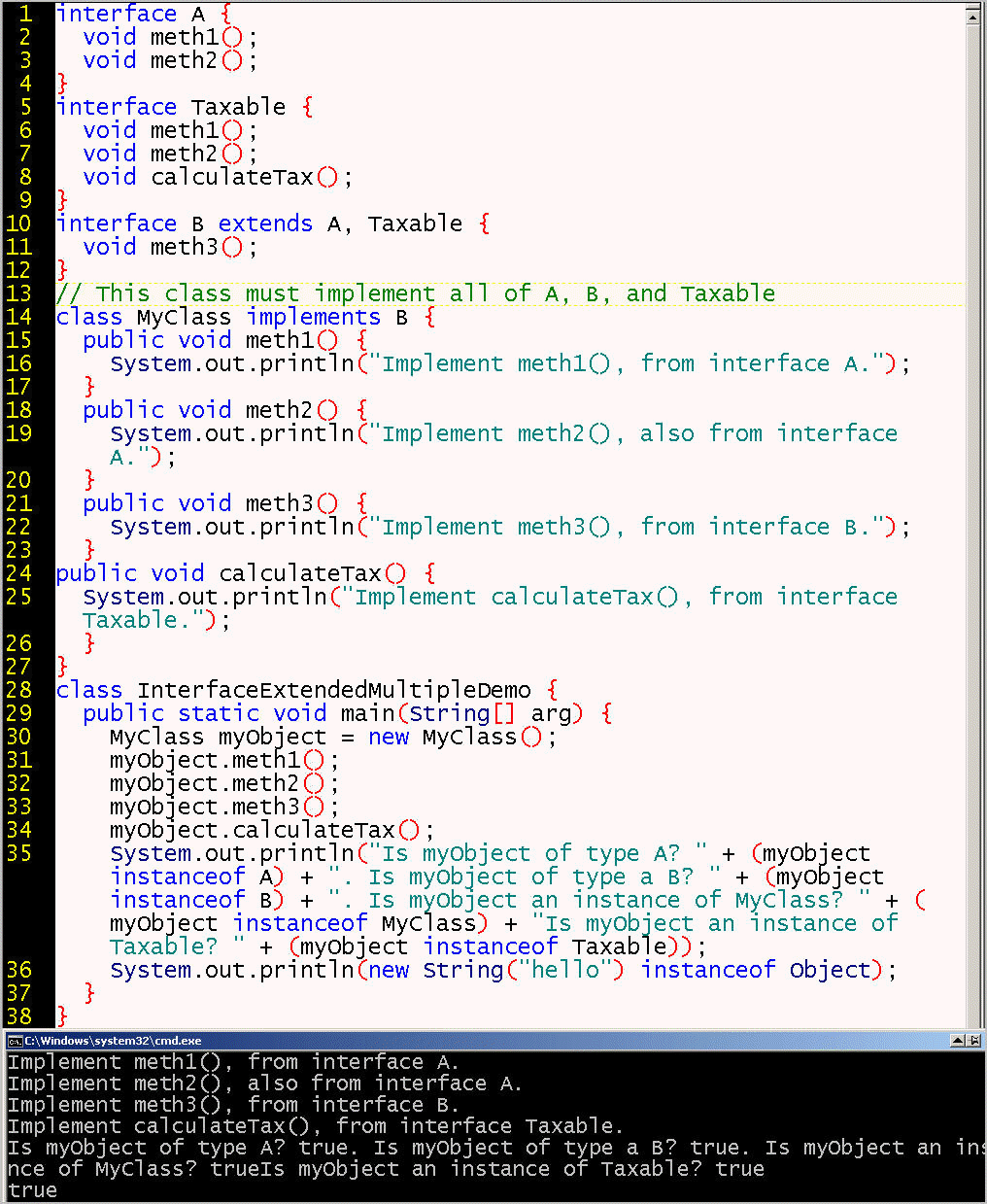
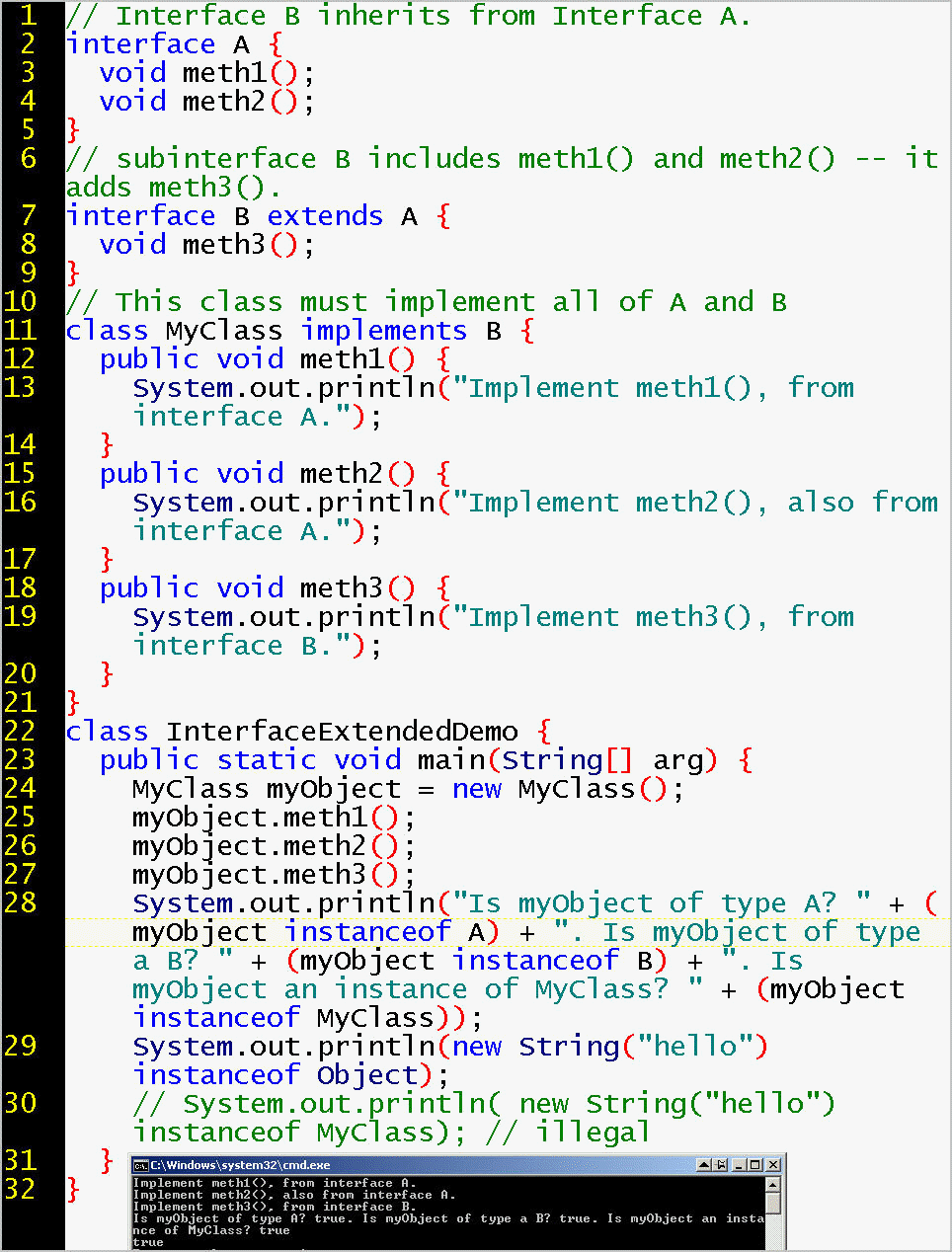
InterfaceExtendedDemo.java includes a subinterface, which also uses the instanceof operation to show that an object is of ALL the types and supertypes it is an instance of, including any superinterfaces, subinterfaces, abstract classes, any non-abstract classes.
The Serializable interface has many subinterfaces: http://download.oracle.com/javase/6/docs/api/java/io/Serializable.html
Some of these subinterfaces have their own subinterfaces: http://download.oracle.com/javase/6/docs/api/java/security/PublicKey.html
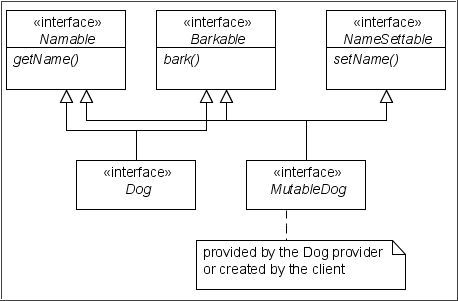
One use case for extending interfaces is to perform something a bit similar to multiple inheritance that I call "cumulative obligation". A subinterface called Dog might inherit the contract for getName() and bark(). However, there is no need to support the renaming of a dog object. The subinterface called MutableDog might also inherit the setName() contract. The application that implements the MutableDog interface has to provide a code block for each of three methods, including support for the renaming of a dog object.
Another example: the IReplacableByPatron subinterface for a library might extend both the ILibraryProperty interface and the IDonor interface. In this scenario, normally if a patron loses a library item, the patron must eventually pay the library to order a replacement item, which might be slow, expensive (many publications cost ten times more for a library to order than for a single person to order), and require the involvement of a remote billing department. If instead, the patron chooses to quickly locate and donate the item from some third party (such as Amazon, eBay, or Craigslist), the library can get the item back in circulation quicker and cheaper, and keep its donor happy as well. The library can use the IDonor interface to avoid charging the patron a fine.
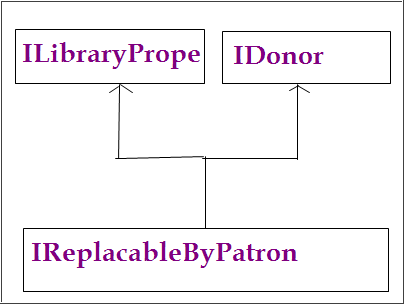
You already know that you can write a subclass that inherits from its
superclass by using the keyword extends.
Similarly, you can write an interface that inherits from an existing interface,
and the keyword remains extends.
Here we also see that a subinterface can extend a comma-separated list of superinterfaces. Similarly, the implementing class can implement a comma-separate list of interfaces. Indeed, a class can implement zero, one, or any number of interfaces. The syntax is shown in MultipleInterfaceImplementationDemo.java:
class ClassName implements Interface1, Interface2, Interface3 { ... }
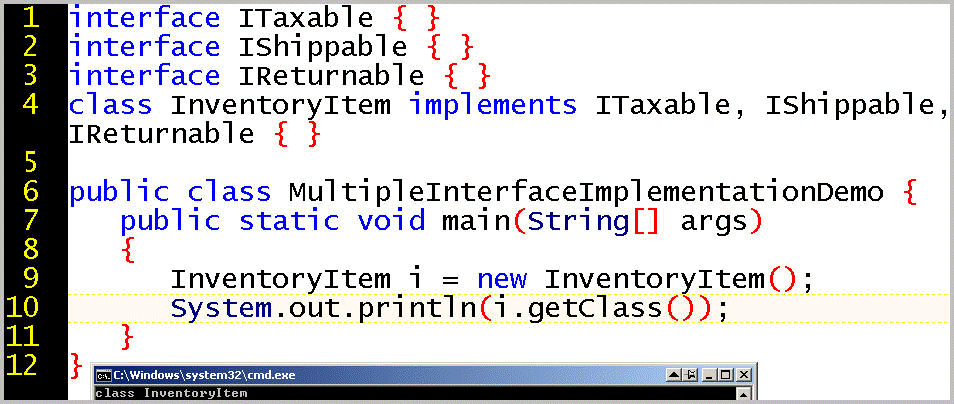
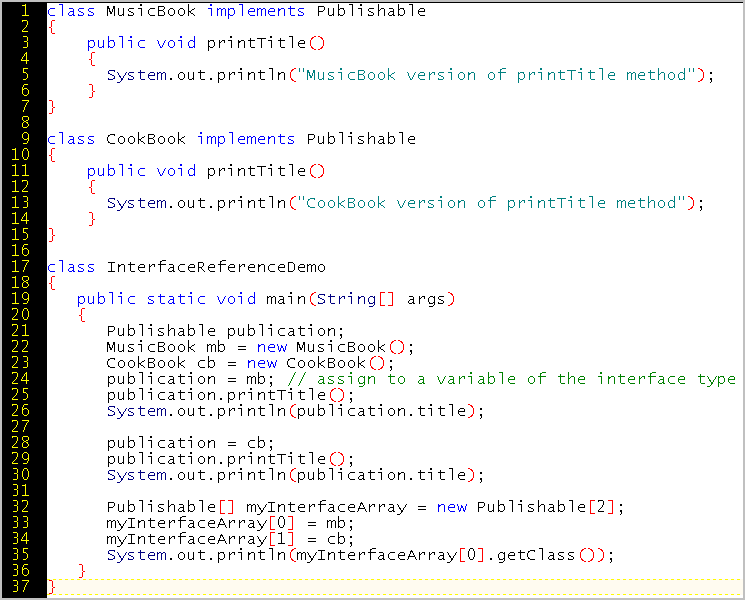
An interface reference variable accepts a reference to any object of any class that implements that interface. For example, the Internal Revenue Service will accept revenue from all items that implements the ITaxable interface, such as an electro-plated brass-alloy cross-saddle-split-clamp-reverse-threaded-opposite-spiraled-decoupling device disassembler, even if the IRS does not know what the taxable item is (or whether it is supercalifragilisticexpialidious or antidisestablishmentarianistical).

An array element can store an object of any type that implements the interface type. For example, the array of type ITaxable defined on line 22 accepts an object of type MonacoTax on line 23 because objects of this type can also be considered objects of type ITaxable.
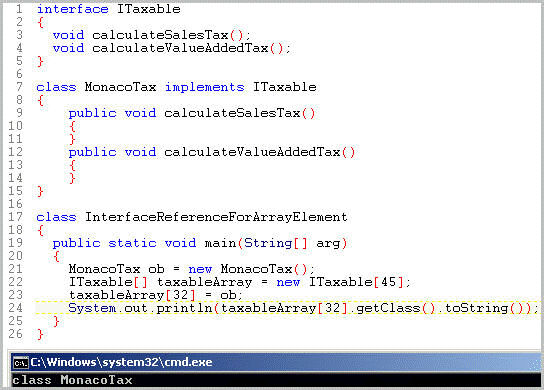
Another example of this concept:
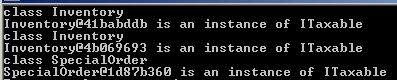
The output is:
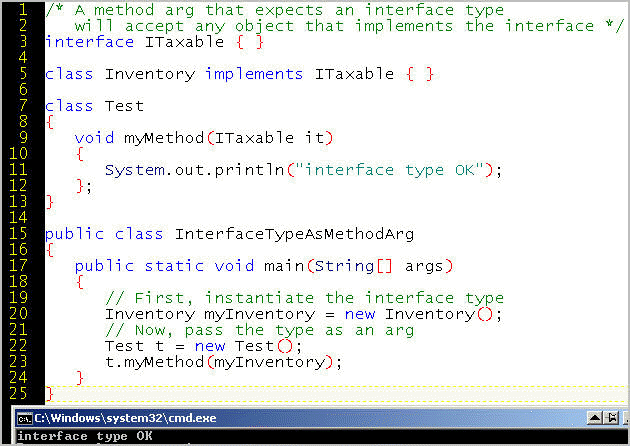
Just as we refer to both a dermatologist and a brain surgeon as "doctor", so a method's formal parameter that requires an interface type will accept a runtime argument of any class that implements the interface. (Even a dentist will claim the status of implementing the interface, and require that office staff refer to her or him as "Doctor".) Here, we pass an argument of type ITaxable.
An interface is a type, just as a class (even an abstract class) is a type.
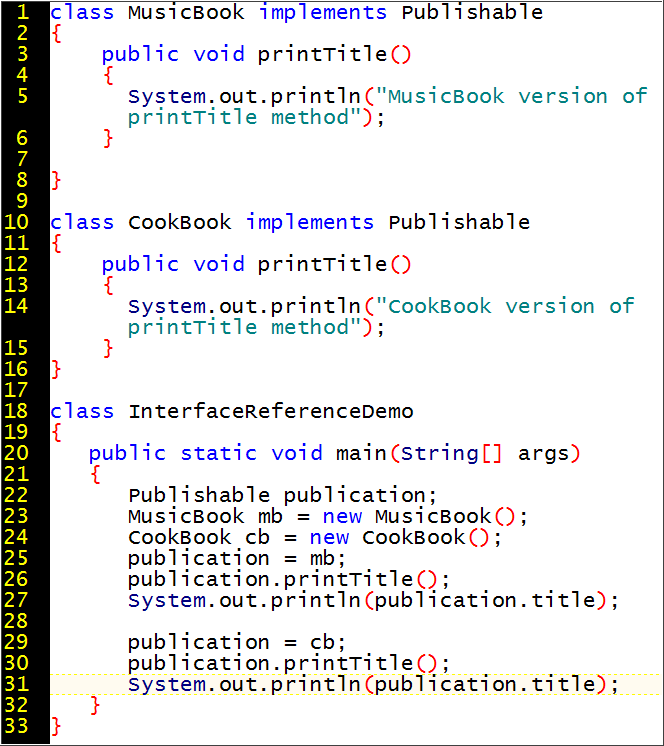

Another example. How does line 56 relate to lines 59 and 62? Does the interface reference variable, ob, know about methods and variables specific to the classes that implement the interface? Imagine we have a class with main called SeriesDemo.
A package is a set of related classes that can be grouped within the namespace specified by the name of the package. Packages prevent name collision between classes that risk having methods of the same name even though the behavior might need to be different, such as authenticateUser(), export(), calculate(), update(), print(), or save(). For example, printing a photograph might be different than printing numbers or text, and saving a JPEG with compression might be different than saving a one-line text file.
Recall that packages organize the Java application programming interface:
java.util is a package that comes with the
SDK (see
http://java.sun.com/javase/6/docs/api/java/util/package-summary.html). Among
the utilities in this package is the Calendar class:
http://java.sun.com/javase/6/docs/api/java/util/Calendar.html, which
provides "a set of
calendar fields such as YEAR, MONTH,
DAY_OF_MONTH, HOUR, and so on, and for manipulating
the calendar fields, such as getting the date of the next week." A class
can import a package, which gives the coder easy access to the classes in the
package by using the short name instead of the fully-qualified name.
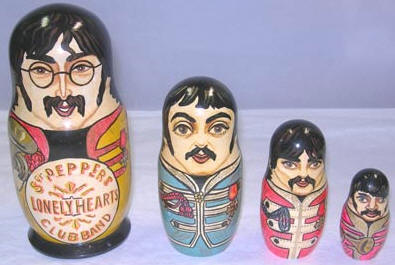
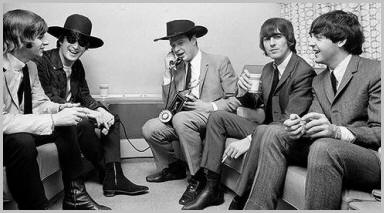
In Week 7, we learned about access control at the class level. A class member can be declared public or private. This is a good kind of encapsulation, but this encapsulation can itself be encapsulated within package-level encapsulation, because a package contains one or more classes. To make an analogy with Russian dolls, some John Lennon fans consider that John's overarching ambition and raw energy is the container for Paul's pop-music skills, even if Paul came up with the idea of bringing George into the Beatles and sometimes directed George's strumming and picking. Finally, even Ringo himself admitted that, in terms of musical inventiveness, he was last and least of the Fab Four, and merely pounded the drums as instructed. If a journalist wanted to know the history of the Beatles or a Beatles song, the best strategy would have been to ask John, who more than the others encapsulated and controlled what the Beatles were about.
(In practice, the interface to the band members was through a phone call
to their manager, Brian Epstein. Musically, the other guy in the hat, John, was
the leader.)
What can be made private? How about an entire class? No. A private class would allow no access and would be useless. There are only two access levels for a class: public or the nameless default, which is accessible within the package (the current directory).
If you declare a class to be public:
| Class Specifier | within the package | outside the package |
|---|---|---|
public |
X | X |
default (undeclared) |
X |
Let's look at two examples:
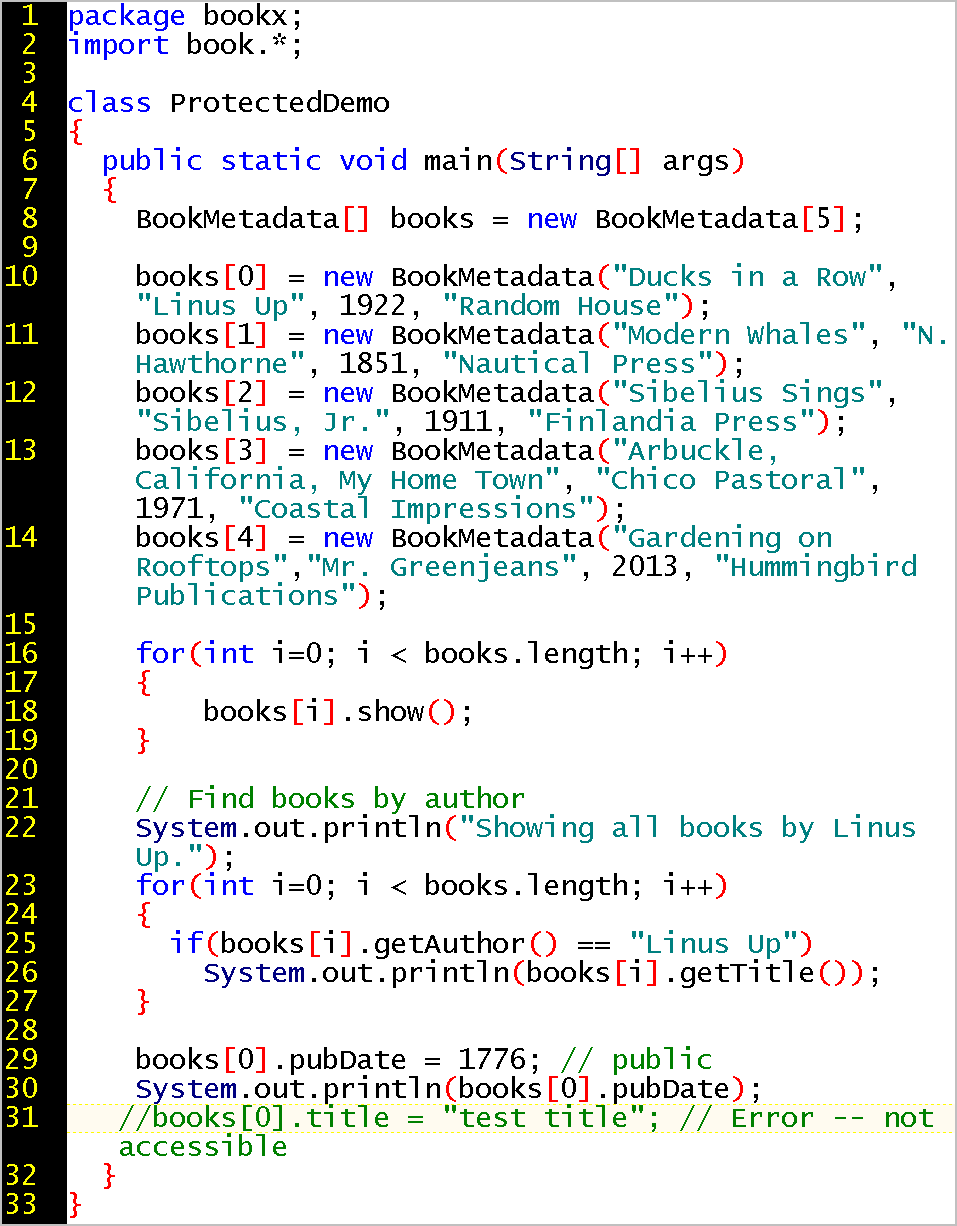
The access modifier protected allows a subclass to access that member, even if that subclass is in a different package.
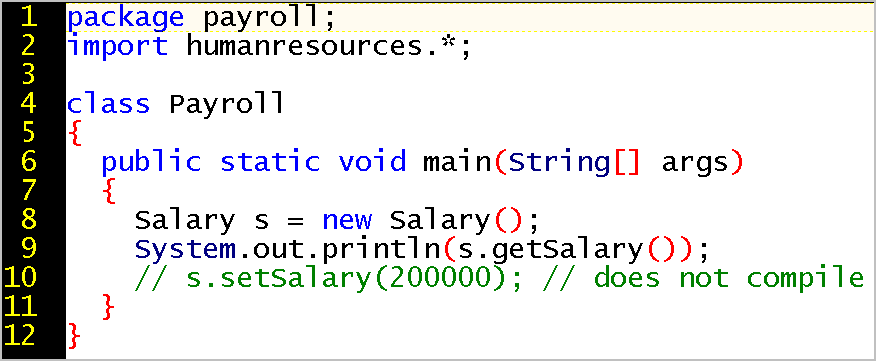
The first line in the file declares that the class belongs to the packages:
package payroll;
You can then import any other packages, if you want.
import humanresources.*;
To compile and run:
D:\packages\test>javac AnimalPackageDemo.java
D:\packages\test>java AnimalPackageDemo
The output is:
Inside AnimalPackageDemo
Beast roar
Dogs might fetch
Many organizations might have a Spreadsheet class with a Print method. How do we avoid confusion? By using the uniquenss of internet names. The Java convention is to reverse the order of the URL:
A Java Archive, that is, a single file that contains multiple files. The archive generally contains .class files. (An installer might update the PATH so that the application can easily be run.) The archive is unifies all is files in one deliverable, compresses the amount of disk space it needs, and is executable! The archive can also be used to ship your homework (.java files), the way an open source project might deliver source code.
A jar that meets the Homework specification: doctorjar.jar
Assuming you have all the .java source code files, the .class bytecode files, and the manifest file in one directory, at the command line, navigate to that directory and build the jar with the syntax:
jar cmf manifestname.txt jarname.jar *
For example:
jar cmf myManifestForTheClassWithMain.txt
myJarFile.jar *
where
- jar invokes the jar utility
- cmf means create a jar with the manifest file
- myManifestForTheClassWithMain.txt is the file discussed in Step 2 that indicates which class has the main method
- myJarFile.jar is the name of the jar (which normally ends in .jar to indicate that it is a jar file), and
- * means to include all the files in the current directory (and any subdirectories) in the newly created jar.
Note that many software vendors ship their jar with the .class files but not the .java files. However, your instructor does want to see your source code. (We are doing open source development.)
To run a jar file:
java -jar surgeonInAJar.jar
To see a listing of the files in a jar:
jar tf surgeonInAJar.jar
To extract ("inflate") the contents of a jar:
jar -xvf surgeonInAJar.jar
Note that the manifest file indicates which class has the main method, followed by two blank lines:

We can now rebuild the jar with the syntax:
jar cmf manifestname.txt jarname.jar *
In this case, jar cmf manifest-for-doctorjar.txt doctor.jar *
Tips:
To verify that its files can
be extracted to expose that files it contains: the manifest, the *.class files,
the *.java files:
jar xvf myJarFile.jar
However, this assignment is to email the instructor solely the .jar file,
not a .zip file. Remember, all that an installer program needs to deploy is
a single .jar file. The one jar file can be used to run all the functionality
involving multiple .class files in multiple
directories. Typically, a commercial customer would not expand the
.jar
file (or even notice its existence). In some companies, the IT department might
validate the jar before mass deployment. In any case, I will expand your .jar file so I can examine
the manifest file and source code.
If you want to practice more ...
To run this Jar: java -jar myJarFile.jar
You can download this example of a jar.
If you run it with java -jar myJarFile.jar
The output is:
Dirt bike moves with large, heavy tires
Dirt bike stops quickly with metal disk brakes even in rain and mud
Road bike moves with thin, light tires for speed
Road bike not designed for rain and mud
because the jar contains the same code as that of package example: bicycle
Independent of Java or any specific programming language are the general data structures used in computer science to handle large amounts of data. Common data structures include arrays, stacks, queues, linked lists, trees, heaps, graphs, and hash tables.
A hash table is an associative array that provide one way to index a database (or data store), such as a dictionary with a spelling checker, or a large online catalog of DVDs, that needs to quickly find any entry among a set of items of a stable size. Note: a compiler can create a dictionary of all the tokens in a program, and use a hash table to quickly access each item. (Other data structures are more appropriate if the data set frequently changes its size.)
A scenario: it is not efficient to search and search with a single array containing 50,000 elements that represent each word in the English dictionary. We also do not want to create and maintain 50,000 arrays of one element each. Instead, we want the dictionary of 50,000 English words be stored and indexed in, say, 500 buckets. If we use only 26 buckets, such as the 26 letters of the alphabet, each bucket will have too many entries, and the bucket sizes will not be even because few words begin with "x" but many begin with "s".
A hash function generates a set of "buckets" to store the items in. It might start with the ASCII value of the letters in a word, then use the modulus operator to get a smaller range of numbers. A hash table algorithm might be:
arraySize = numberWords * 2; // * 2 provides extra
space for collisions
arrayIndex = hugeNumber % arraySize; // smaller number of buckets
where hugeNumber represents the product of the ASCII value of every letter in the largest possible English word.
Suppose two words, "give" and "tick" happen to result in the same index value? We either put the extra word in the nearest empty bucket, or we implement each bucket as an array that can contain a reasonably small number of words.
This summary is based on Data Structures and Algorithms in Java by Mitchell Waite and Robert Lafore - http://www.amazon.com/Structures-Algorithms-Mitchell-Waite-Signature/dp/1571690956. See also http://en.wikipedia.org/wiki/Hash_table.
Apache Hadoop is written in Java, distributed in jar files, and is used for big data, to enable parallel searching and processing across clusters of computers. Two key technologies are the Hadoop distributed file system and the MapReduce model to manage the distributed work.